
How to Get Help in BillClap: Call, WhatsApp, Raise a Ticket or Watch Tutorials
Getting Help Inside BillClap
Help is always one click away. From any page in BillClap you can talk to our support team, raise a ticket for a bug or a new idea, track our replies, and watch short how-to videos.
1. Talk to Our Support Team
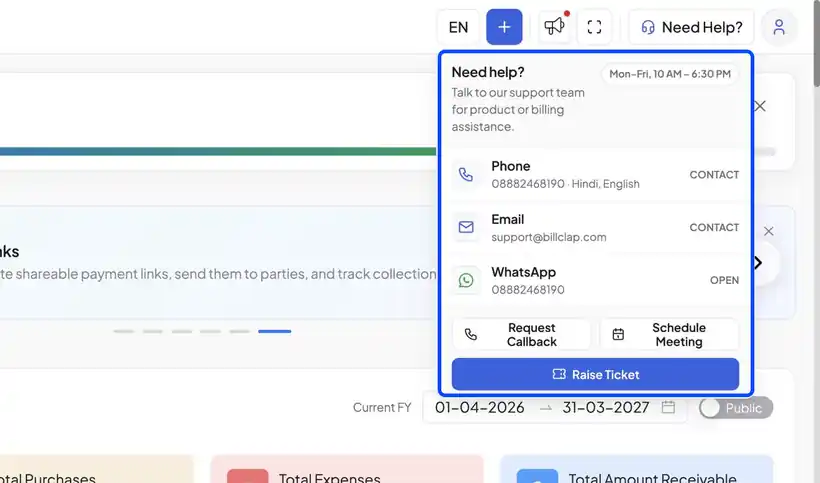
- Click Need Help? at the top right of any page
- You'll see our support hours: Monday to Friday, 10 AM – 6:30 PM
- Call us, email us, or chat on WhatsApp
- You can also Request Callback, or Schedule Meeting with our team
2. Raise a Ticket for a Bug or New Idea
- In the Need Help panel, click Raise Ticket
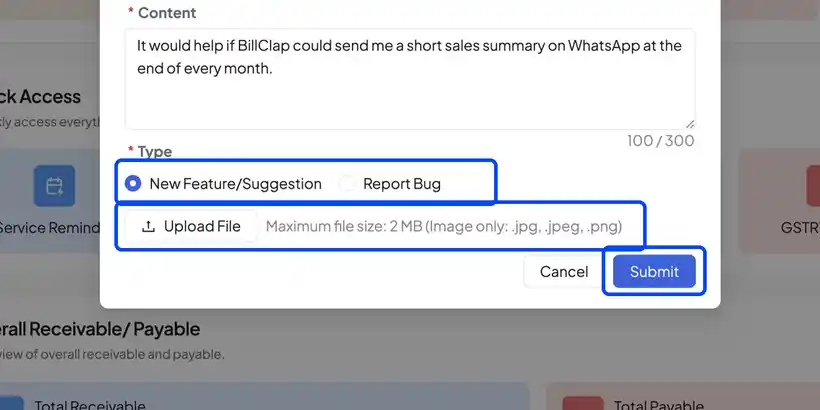
- Add a short title, then describe the issue or idea in detail
- Pick the type: New Feature/Suggestion or Report Bug
- Attach a screenshot if it helps (JPG or PNG, up to 2 MB)
- Click Submit
3. Track Your Tickets
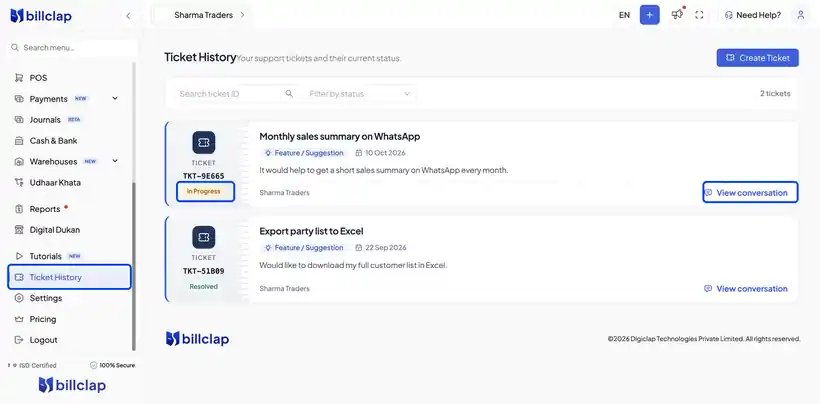
Open Ticket History from the menu to see every ticket you have raised, with its status (for example, In Progress or Resolved). Click View conversation to read our replies.
4. Learn with Tutorials
To learn any feature, open Tutorials from the menu. Search for a topic or pick a category, and press play.
Frequently Asked Questions
Q: How soon will I get a reply to my ticket?
Our team replies during support hours, Monday to Friday, 10 AM – 6:30 PM. You can follow the status in Ticket History.
Q: What should I include in a bug report?
Tell us what you did, what you expected and what happened instead. A screenshot of the screen helps us fix it faster.
Q: Can I suggest a new feature?
Yes. Raise a ticket and choose New Feature/Suggestion.
Need Help?
Our support team is available:
- 📞 Call/WhatsApp: 8882468190
- 📧 Email: support@billclap.com
- 🕐 Support Hours: Monday to Friday, 10 AM – 6:30 PM