
How to Use the Receivable Ageing Report in Billclap
How to Use the Receivable Ageing Report in Billclap
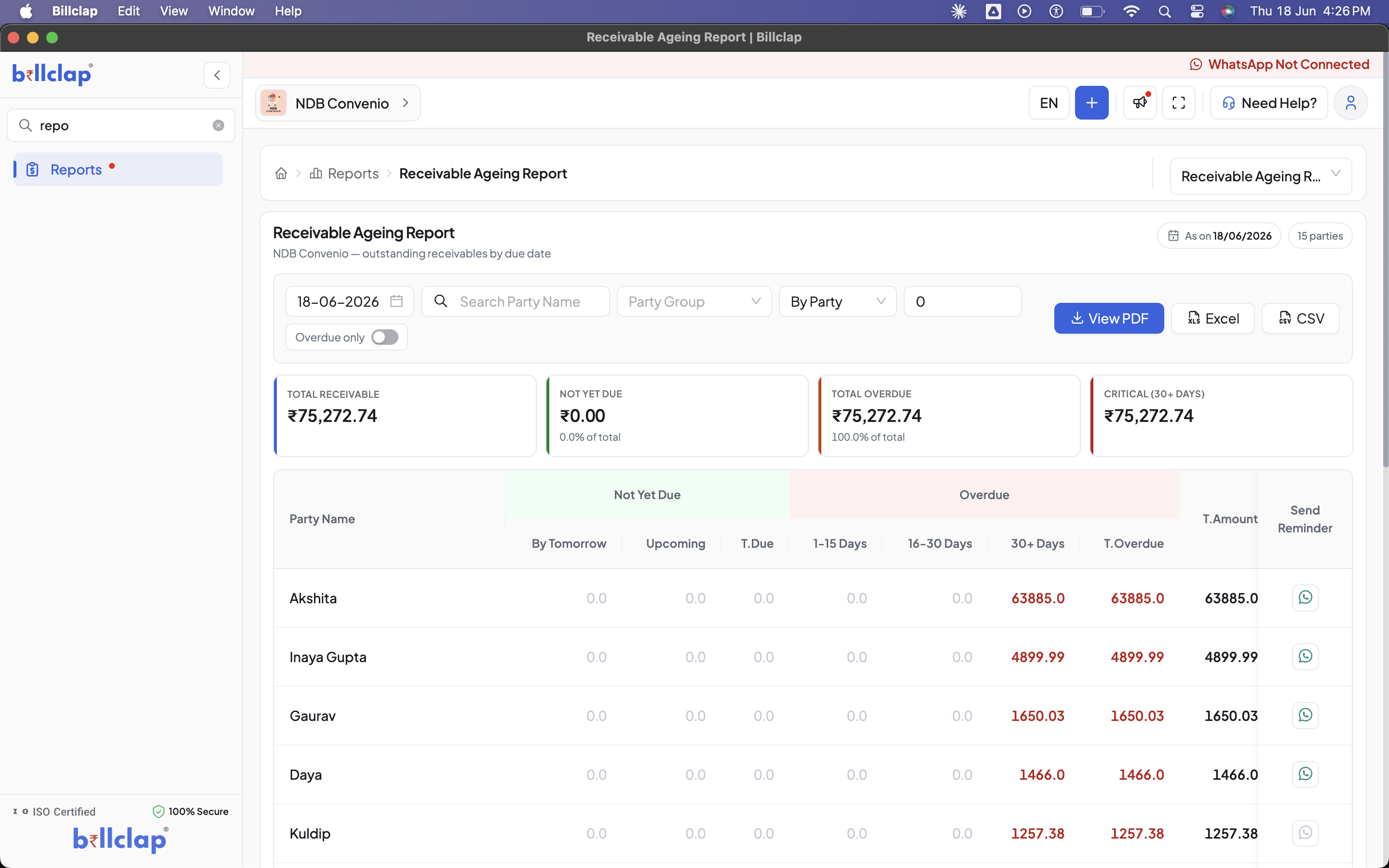
The Receivable Ageing Report is one of the most powerful collection tools in Billclap. It gives you a clear, date-wise picture of all outstanding payments from your customers — showing exactly who owes you money, how much, and for how long. No more chasing records manually or forgetting who to follow up with.
What is the Receivable Ageing Report?
When you sell goods or services on credit, customers owe you money. Over time, these outstanding amounts can pile up and hurt your cash flow. The Receivable Ageing Report organizes all these pending dues by how old they are — helping you prioritize collections and take action before small dues become big problems.
Think of it as your personal "Paisa Kab Aayega?" dashboard — always up to date, always accurate.
Where to Find This Report
- Log in to your Billclap account
- From the left sidebar, click on Reports
- Select Receivable Ageing Report from the reports list
Understanding the Report Dashboard
Summary Cards at the Top
The report opens with 4 key summary cards that give you an instant overview:
| Card | What it Shows |
|---|---|
| Total Receivable | The total outstanding amount across all parties as of the selected date |
| Not Yet Due | Amount that is still within the payment due date — not overdue yet |
| Total Overdue | Amount that has crossed the due date and is now pending collection |
| Critical (30+ Days) | High-risk amount that has been overdue for more than 30 days — needs urgent attention |
💡 Tip: If your "Critical (30+ Days)" amount equals your "Total Receivable", it means 100% of your outstanding dues are long overdue — act immediately!
Ageing Buckets — The Heart of the Report
The report breaks down each party's outstanding amount into time-based buckets so you know exactly how old each due is:
| Bucket | What it Means |
|---|---|
| By Tomorrow | Payment due by the next day — follow up today |
| Upcoming | Payment due in the near future — not urgent yet |
| T. Due | Total amount due (sum of all not-yet-due buckets) |
| 1–15 Days | Overdue by 1 to 15 days — send a gentle reminder |
| 16–30 Days | Overdue by 16 to 30 days — follow up more firmly |
| 30+ Days | Critically overdue — escalate immediately |
| T. Overdue | Total overdue amount for that party |
| T. Amount | Grand total receivable from that party |
Sending Payment Reminders via WhatsApp
Each party row has a WhatsApp icon button on the right side. With a single click, you can send an instant payment reminder directly on WhatsApp to that customer — no copy-pasting, no manual messaging.
✅ How to send a reminder:
- Find the party you want to remind in the list
- Click the WhatsApp icon on the right side of their row
- A pre-filled reminder message will be sent to their registered WhatsApp number
⚠️ Note: Make sure your WhatsApp is connected in Billclap Settings for this feature to work. If you see "WhatsApp Not Connected" at the top right, go to Settings → WhatsApp Integration to connect it first.
Filters and Customization
You can customize the report view using the available filters:
- Date Filter: View receivables as of any specific date — useful for month-end reviews
- Search Party Name: Quickly find a specific customer's outstanding dues
- Party Group: Filter by customer groups (e.g., Retail, Wholesale, VIP)
- By Party / By Bill: Switch between party-wise view (consolidated) and bill-wise view (individual invoice level)
- Overdue Only Toggle: Enable this to hide all non-overdue entries and focus only on what needs collection
- Minimum Amount Filter: Set a minimum amount to filter out very small dues
Exporting the Report
You can export the Receivable Ageing Report in three formats:
- 📄 View PDF — Download a professionally formatted PDF to share with your team or accountant
- 📊 Excel — Export to Excel for further analysis or custom sorting
- 📋 CSV — Export raw data for integration with other tools
Best Practices for Using This Report
- ✅ Review this report every Monday morning to start the week with a clear collections plan
- ✅ Use the "Overdue Only" toggle for a focused view during follow-up sessions
- ✅ Prioritize the 30+ Days bucket — these are your highest-risk dues
- ✅ Send WhatsApp reminders in bulk at the start of each week for all overdue parties
- ✅ Export to Excel monthly and share with your accountant for reconciliation
- ✅ Use Party Groups to segment collections by customer type (wholesale vs retail)
Frequently Asked Questions
Q: What is the difference between "Total Overdue" and "Critical (30+ Days)"?
Total Overdue includes all amounts that have crossed their due date — even by 1 day. Critical (30+ Days) is a subset of that, showing only amounts overdue by more than 30 days, which require urgent action.
Q: Can I send reminders to all overdue parties at once?
Currently, reminders can be sent one party at a time using the WhatsApp button. We recommend using the "Overdue Only" filter to see only parties that need a reminder and then sending them sequentially.
Q: Why is a party showing ₹0 in all columns?
This may happen if the party has pending transactions but all dues fall outside the current date range selected, or if the outstanding amount was recently cleared but the report hasn't refreshed. Try changing the date or refreshing the page.
Q: How is the due date calculated for each invoice?
The due date is based on the payment terms set at the time of creating the invoice or the default payment terms configured for that party in Party Management.
Q: Is this report available on the Billclap mobile app?
Yes! The Receivable Ageing Report is available on both the Billclap web app and the mobile app, so you can track collections on the go.
Need Help?
If you face any issues with the Receivable Ageing Report or need assistance setting up payment terms and party management, our support team is available:
- 📞 Call/WhatsApp: 8882468190
- 📧 Email: support@billclap.com
- 🕐 Support Hours: Monday to Saturday, 10 AM – 7 PM