
How to Read Your Business Numbers on the BillClap Dashboard
The BillClap dashboard shows how your business is doing on one screen: what you sold, what you spent, who owes you and how this month compares with last month.
Step 1: Read the Business Overview
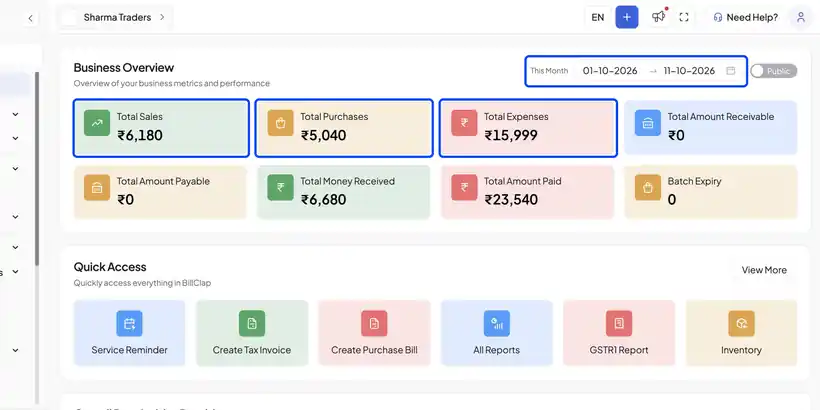
- The dashboard opens on Business Overview.
- Pick the period at the top, for example This Month.
- The first row shows your total Sales, Purchases and Expenses for that period.
- The second row shows Money Received and Amount Paid, the cash that actually came in and went out. Batch Expiry flags stock batches that are about to expire.
Step 2: Check Who Owes You
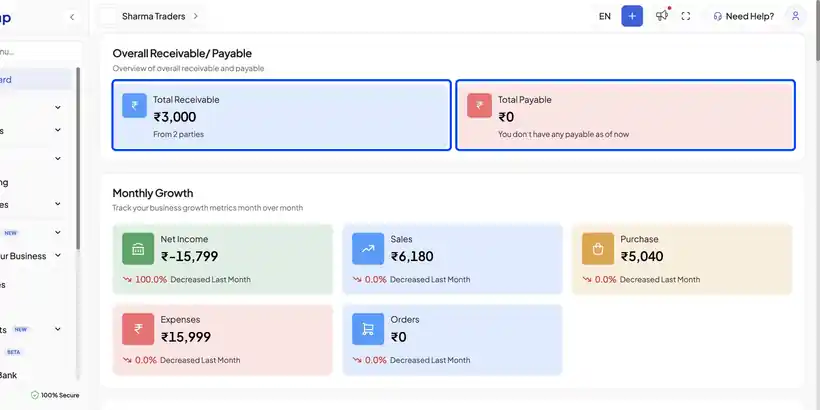
- Scroll down to Overall Receivable.
- Total Receivable is what customers still owe you, with the number of parties.
- Total Payable is what you still owe your suppliers.
Step 3: Compare with Last Month
Monthly Growth compares this month with last month for net income, sales, purchases, expenses and orders. A red arrow means a drop, a green arrow means growth.
Step 4: Spot Trends and Top Bills
- Analytics charts six months of revenue, purchases, expenses and profit, so you can spot a weak month quickly.
- Top Sales and Top Purchases list your biggest bills from the last six months, with their payment status.
Frequently Asked Questions
Q: What is the difference between Sales and Money Received?
Sales is the total value of invoices you created. Money Received is the payment actually collected. The gap is what customers still owe.
Q: Can I see numbers for a custom date range?
Yes. Change the period at the top of Business Overview. For detailed reports, use the Reports section.
Q: Who can see the dashboard?
Only users whose role includes the Dashboard tab. You can hide it for staff in User Roles.
Need Help?
Our support team is available:
- 📞 Call/WhatsApp: 8882468190
- 📧 Email: support@billclap.com
- 🕐 Support Hours: Monday to Friday, 10 AM – 6:30 PM