
How to Add a Product in BillClap (Price, GST, HSN and Opening Stock)
Add a Product the Right Way
Set up a product properly once, and every invoice, purchase bill and POS bill gets the right price, GST and stock automatically. It takes three steps.
Step 1: Name and Prices
- In the left menu, open Products, then click Add Product
- Choose Goods or Service
- Type the product name
- Add the MRP
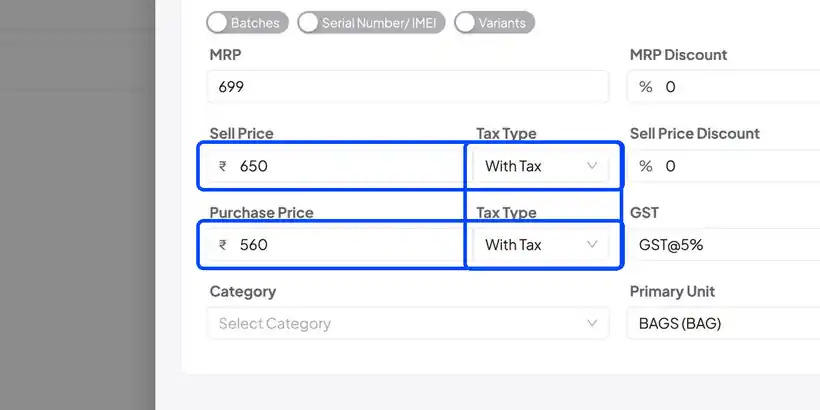
- Enter the sell price and the purchase price
- Choose With Tax if your price already includes GST, or Without Tax if GST should be added on top
Step 2: GST Rate and Unit
- Pick the GST rate for this item, for example 5%
- Pick the primary unit you sell it in, for example bags, pieces or kg
- Category is optional — use it to group similar items
Step 3: HSN Code and Opening Stock
- Open Additional Fields
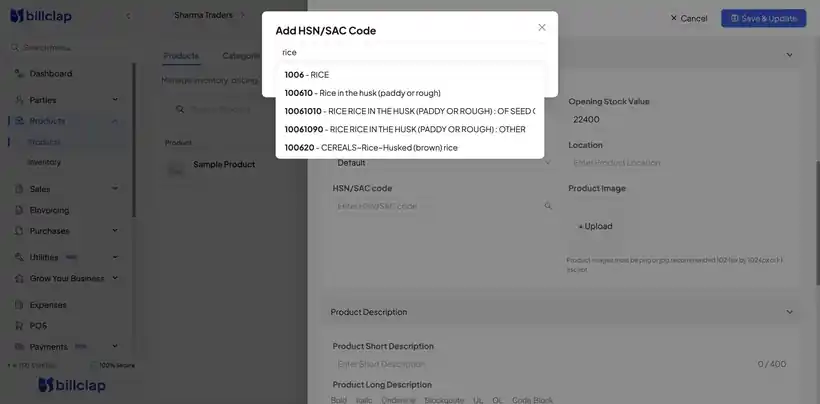
- Click the search icon next to HSN code, type the product name, and pick the right code from the list
- Enter your opening stock and its value, so your inventory is right from day one
- Click Save and Update
Your product now appears in the product list with its stock, HSN code and prices, ready to pick on any bill.
Why These Fields Matter
| Field | Why it matters |
|---|---|
| GST rate | Tax is calculated correctly on every invoice and appears correctly in your GST reports |
| HSN code | Prints on your invoices and is used in the HSN summary of your GSTR-1 |
| Opening stock | Your stock levels are correct from the first day; sales reduce it and purchase bills increase it |
| Purchase price | Used for profit and stock value reports |
Frequently Asked Questions
Q: I don't know my HSN code.
Use the HSN search in Additional Fields — type your product name and pick the closest match. Ask your CA if you are unsure.
Q: My stock is showing a negative number.
This happens when you sell more than the stock recorded. Add your opening stock, or record your purchase bills so stock goes up.
Q: Should I choose With Tax or Without Tax?
Choose With Tax if the price you charge already includes GST (common for retail/MRP pricing). Choose Without Tax if GST is added on top of your price.
Need Help?
Our support team is available:
- 📞 Call/WhatsApp: 8882468190
- 📧 Email: support@billclap.com
- 🕐 Support Hours: Monday to Friday, 10 AM – 6:30 PM