
How to Close the Financial Year and Restart Invoice Numbers in BillClap
On 1 April most businesses start their invoice numbers again for the new financial year. In BillClap you do this with Close Financial Year. It gives each document type a new prefix and restarts the numbering. Your old bills, parties, products and stock are not touched.
Before you start
- Finish billing for the old year. Enter any pending invoices, returns and purchase bills first.
- Decide your new prefixes. A common style is the year, for example
26-27/, so the first invoice of the year prints as 26-27/1.
Step 1: Open Close Financial Year
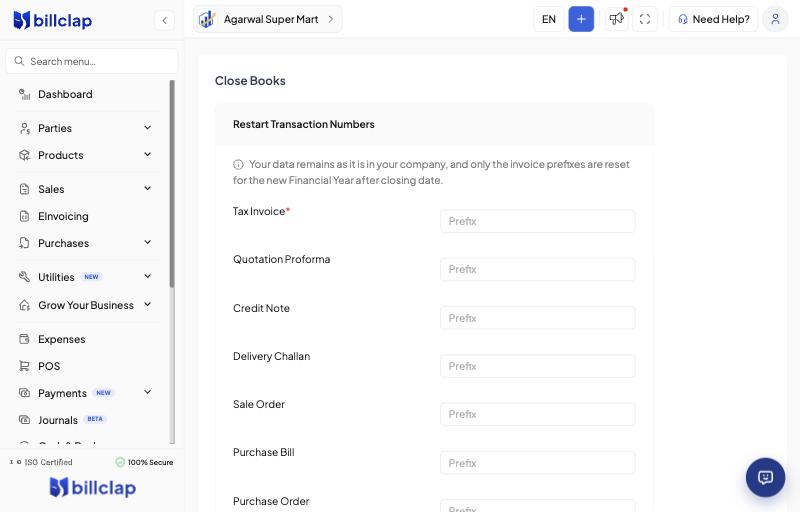
In the left menu, click Utilities, then Close Financial Year. The Close Books page opens with a section called Restart Transaction Numbers.
Step 2: Enter the new prefixes
Type a prefix for each document you use:
- Tax Invoice (required)
- Quotation Proforma
- Credit Note
- Delivery Challan
- Sale Order
- Purchase Bill
- Purchase Order
- Debit Note
Step 3: Click Done
Scroll to the bottom and click Done. New documents now use the new prefix. Click Cancel if you want to leave without changing anything.
What changes and what does not
| Changes | Stays the same |
|---|---|
| Prefix and numbering of new invoices and other documents | All old invoices, bills and their numbers |
| Customers, vendors and their balances | |
| Products and stock | |
| Reports for earlier dates |
Frequently Asked Questions
Q: Will I lose last year's data?
No. Your data remains as it is. Only the prefixes are reset for the new financial year.
Q: Can I still see last year's reports?
Yes. Open any report and pick last year's dates.
Q: Can I change only the invoice number style, without closing the year?
Yes. See the numbering section in How to Customize Your Invoice.
Q: I am not sure which prefix to use. Who can help?
Ask your accountant for the format they prefer, or contact our support team.
Need Help?
Our support team is available:
- 📞 Call/WhatsApp: 8882468190
- 📧 Email: support@billclap.com
- 🕐 Support Hours: Monday to Friday, 10 AM – 6:30 PM