How to Make a Free QR Code for a Link, UPI Payment or Text with BillClap
BillClap has a free QR Code Generator that anyone can use. Turn a link, your UPI ID or a short piece of text into a QR code, download it and print it for your counter, menu, visiting card or packaging.
- No login and no BillClap account needed
- Works in your browser. What you type is not uploaded or saved.
- Free PNG download
Where to find it: this tool is on the BillClap website, not inside the app. Open www.billclap.com/free-qr-code.
Option 1: QR code for a link
Use this for your website, a WhatsApp chat link, your Google Maps location, a menu PDF or any other link.
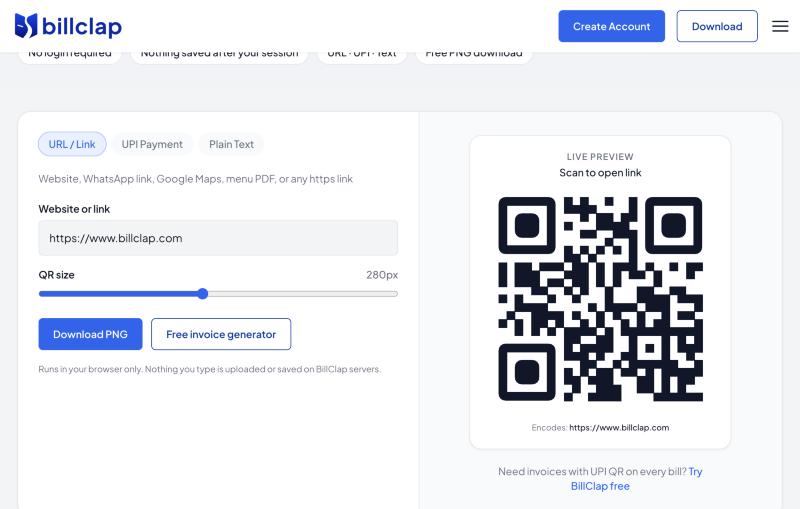
- Keep the URL / Link tab selected.
- Paste your link in Website or link.
- The QR code appears straight away under Live Preview.
- Move the QR size slider if you need it bigger or smaller.
- Click Download PNG.
Option 2: QR code for UPI payments
Print this and keep it at your counter so customers can scan and pay with any UPI app.
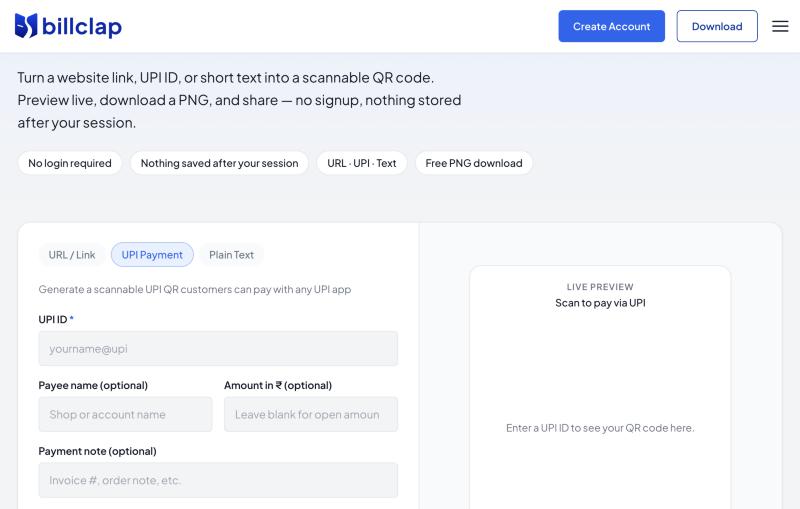
- Click the UPI Payment tab.
- Enter your UPI ID (required), for example
yourshop@upi. - Optional: add the Payee name (your shop's name), a fixed Amount, and a Payment note such as an invoice number.
- Leave the amount blank if customers should type the amount themselves.
- Click Download PNG.
Check before you print: scan the code with your own phone and confirm it shows the right name and UPI ID. A wrong UPI ID sends money to someone else.
Option 3: QR code for plain text
Click the Plain Text tab and type a short message, such as your shop timings, Wi-Fi name or an offer code. Anyone who scans it sees the text.
Tips for printing
- Print it at least 3 cm wide so phones can scan it easily.
- Keep some white space around the code.
- Test the printed copy with a phone before you put it up.
Want a UPI QR on every bill?
If you use BillClap for billing, you do not need to make a QR code each time. Add your bank account and UPI ID once, and BillClap prints a payment QR on your invoices. See Cash & Bank: Manage Multiple Bank Accounts.
Need barcodes for your products instead? See How to Print Barcode Labels.
Need Help?
Our support team is available:
- 📞 Call/WhatsApp: 8882468190
- 📧 Email: support@billclap.com
- 🕐 Support Hours: Monday to Friday, 10 AM – 6:30 PM