
How to Use WhatsApp Marketing Templates in BillClap (Festival Wishes, Offers and More)
You do not need a designer to stay in touch with your customers. WhatsApp Marketing gives you ready-made picture templates for festivals, offers, new arrivals and more. Pick one, download it and share it on WhatsApp.
Note: WhatsApp Marketing is marked BETA in BillClap.
Step 1: Open WhatsApp Marketing
In the left menu, click Utilities, then Whatsapp Marketing.
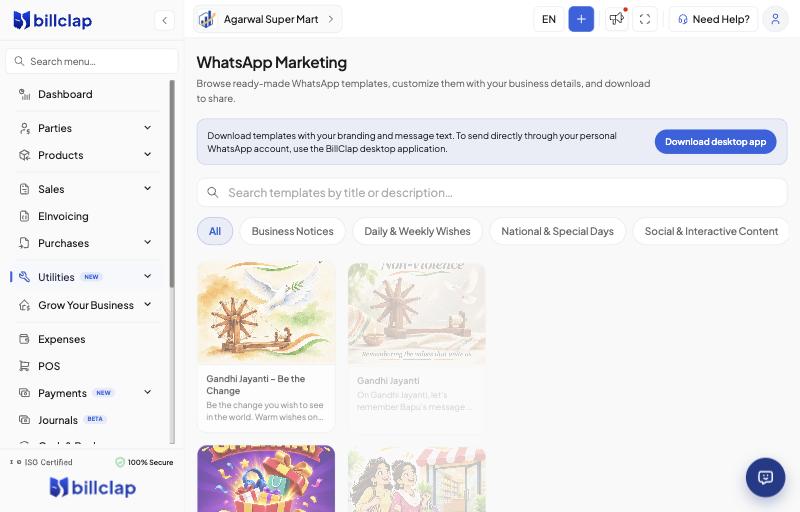
Step 2: Find a template
- Search: type a word such as "Diwali" or "offer" in the search box.
- Browse by category: click a category button at the top.
Categories include:
- Festival Greetings, Seasonal & Festive Campaigns, National & Special Days
- Offers, New Arrivals & Product Launches
- Daily & Weekly Wishes
- Business Notices, Order & Delivery Communications
- Feedback & Reviews, Customer Engagement & Relationship Building
- Social & Interactive Content, In-Store & Community Events
- Informative & Educational Content
Each template comes with a picture and a ready message, such as "Lucky draw is here! Every purchase gives you a chance to win."
Step 3: Preview and download
- Move your mouse over a template. Two buttons appear on the picture.
- Click the eye button to see it full size.
- Click the download button to save it to your computer.
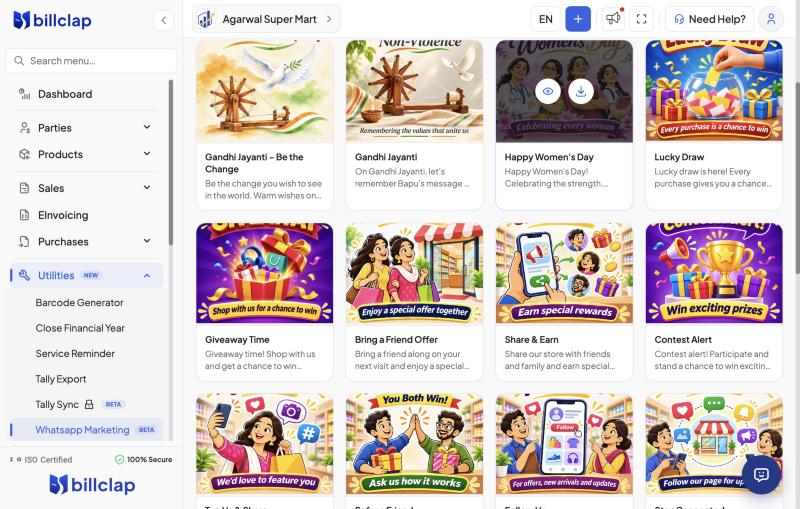
Step 4: Share it on WhatsApp
- Post it as your WhatsApp Status so all your contacts see it.
- Send it to your customer broadcast list or groups.
- Add the template's message, and your own offer details, as the caption.
Send directly from BillClap (desktop app)
On the web, you download the template and share it yourself. To send messages straight from your own WhatsApp account, use the BillClap desktop app. Click Download desktop app at the top of the page.
Tips
- Do not overdo it. One or two messages a week is plenty. Too many and customers mute you.
- Send offers before the weekend or festival, not on the day itself.
- Message only your own customers who expect to hear from you.
Frequently Asked Questions
Q: Is there a charge for the templates?
Check Pricing in the left menu or contact support for what your plan includes.
Q: Can BillClap remind customers about payments on WhatsApp too?
Yes, that is a separate feature. See How to Set Up Auto Reminders.
Need Help?
Our support team is available:
- 📞 Call/WhatsApp: 8882468190
- 📧 Email: support@billclap.com
- 🕐 Support Hours: Monday to Friday, 10 AM – 6:30 PM