
How to Use Journals in BillClap to Track Money Outside Your Bills (BETA)
Some money in a business has nothing to do with a customer bill or a supplier bill: a loan you took, money the owner put in or took out, a deposit, or what you spent on renovating the shop. A Journal is a separate account in BillClap where you record this kind of money coming in and going out, and see its balance.
Note: Journals is marked BETA in BillClap.
Step 1: Create a journal
- Click Journals in the left menu.
- Click New Journal.
- Enter a Journal Name, for example "Bank Loan – HDFC", "Owner's Capital" or "Shop Renovation".
- Check the Journal Date.
- Pick a Category if you use them, and add Notes so you remember what this journal is for.
- Click Save & Close.
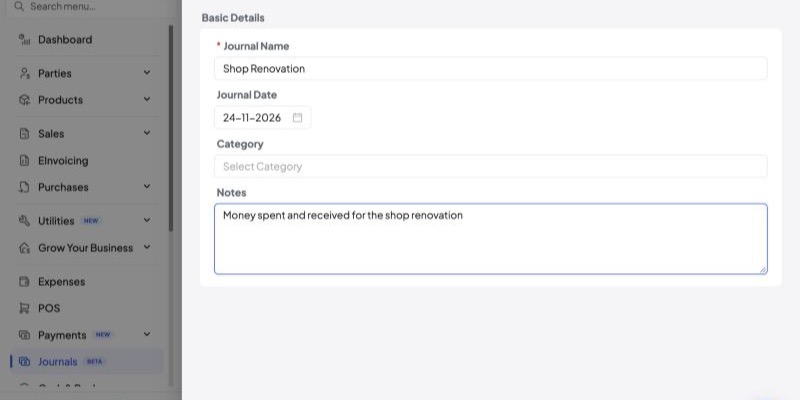
To make your own categories, click Journal Categories at the top of the Journals page.
Step 2: Record money in or out
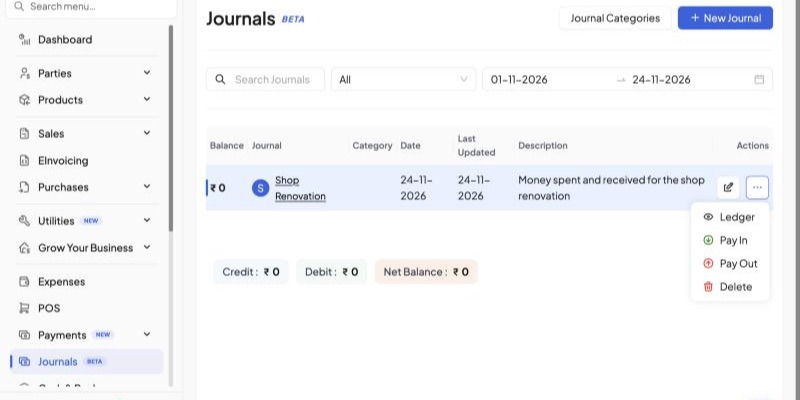
- In the journal's row, click the ⋯ button under Actions.
- Choose Pay In for money received, or Pay Out for money paid.
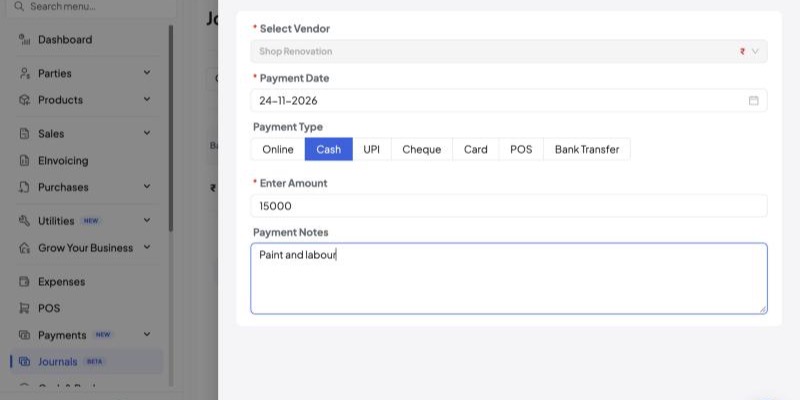
- Check the Payment Date.
- Choose the Payment Type: Online, Cash, UPI, Cheque, Card, POS or Bank Transfer.
- Enter the Amount.
- Write what it was for in Payment Notes, for example "Paint and labour".
- Click Save & Update.
Step 3: Check the balance and ledger
The Journals page shows each journal's Balance. At the bottom you see the totals across all journals: Credit, Debit and Net Balance.
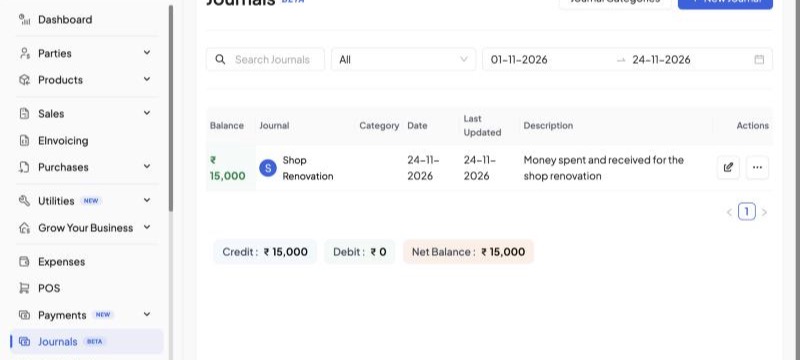
- Click ⋯ › Ledger to see every entry in one journal.
- Use the search box, category filter and date range at the top to find a journal.
- Click the pencil to rename a journal or change its notes.
When to use a journal, and when not to
| Use a journal for | Use something else for |
|---|---|
| Loans taken or given | Sales to customers: make a tax invoice |
| Money the owner puts in or takes out | Money received from or paid to a party: use Payment In / Payment Out |
| Deposits and advances that are not against a bill | Day-to-day costs like rent and salaries: record an expense |
| One-off projects, such as a renovation | Moving money between cash and bank: use Cash & Bank |
If you are not sure where an entry belongs, ask your accountant before you record it.
Frequently Asked Questions
Q: Can I delete a journal?
Yes. Click ⋯ › Delete in its row. Check its ledger first, because its entries go with it.
Q: Do journals change my stock or GST reports?
No. Journals record money only. They have no items and no GST.
Need Help?
Our support team is available:
- 📞 Call/WhatsApp: 8882468190
- 📧 Email: support@billclap.com
- 🕐 Support Hours: Monday to Friday, 10 AM – 6:30 PM