
How to Apply TDS or TCS on an Invoice in BillClap
Some customers deduct TDS (tax deducted at source) when they pay you, and on some sales you must collect TCS (tax collected at source). BillClap lets you add either to a bill, so the amount due and your reports stay correct.
Not sure if TDS or TCS applies to you? Most small shops selling to walk-in customers never need this. Ask your CA before using it.
Step 1: Make the invoice as usual
Go to Sales › Tax Invoices › Create Tax Invoice, select the customer and add the items. See How to Create a GST Tax Invoice.
Step 2: Tick TDS or TCS
Scroll below the item table. On the right, next to Apply TDS, tick TDS or TCS. A new box opens: Apply TDS to your Invoice.
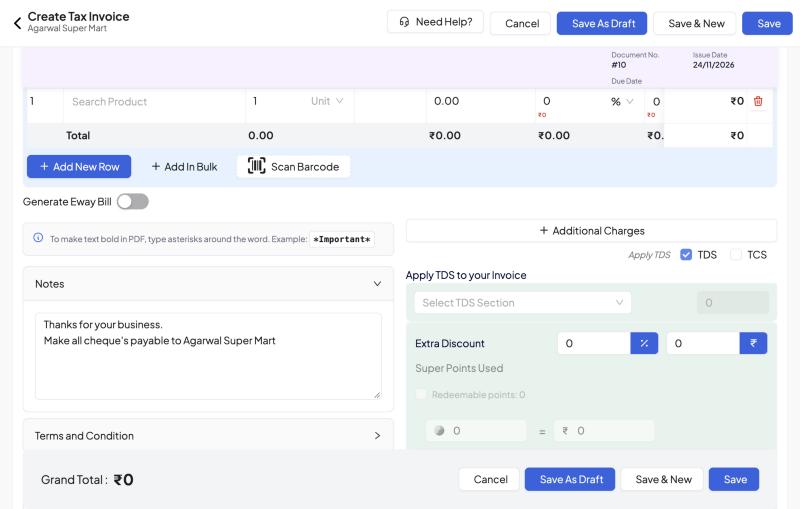
Step 3: Pick the section
- Click Select TDS Section.
- Choose the section that applies. Each one shows its rate and name, for example 1% 194C for contractor payments or 10% 194A for interest.
- BillClap works out the amount from the rate and fills it in the box on the right.
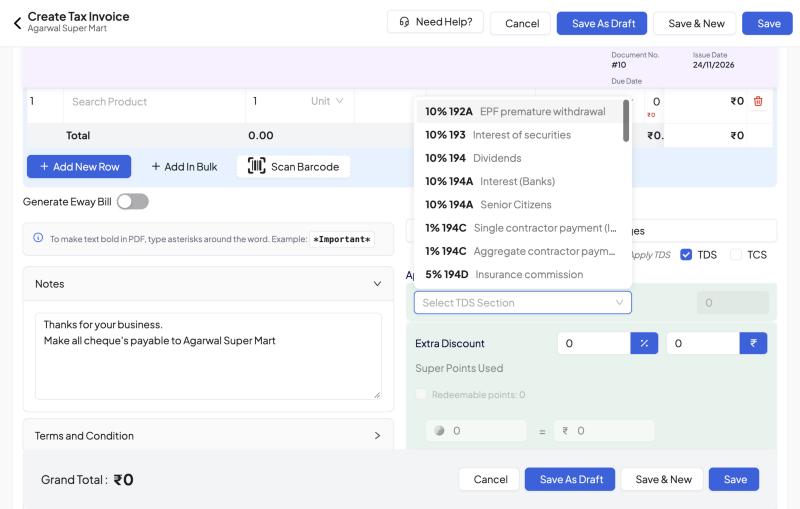
TCS works the same way: tick TCS and pick the section.
Step 4: Check the total and save
Check the totals at the bottom of the form, then click Save.
TDS and TCS on purchases
The same options are on the purchase bill form, for when you deduct TDS from a supplier's payment or a supplier collects TCS from you.
Step 5: Track it in reports
Go to Reports and scroll to TDS Reports:
| Report | Shows |
|---|---|
| TDS Receivable Report | TDS your customers deducted from what they paid you |
| TDS Payable Report | TDS you deducted from suppliers and must deposit |
| TCS Receivable Report | TCS your suppliers collected from you |
| TCS Payable Report | TCS you collected from customers and must deposit |
Download these and share them with your CA at filing time.
Frequently Asked Questions
Q: Which section should I choose?
It depends on the kind of payment. Your CA will tell you the right section and rate. BillClap lists the sections but cannot choose for you.
Q: Is TDS the same as GST?
No. GST is charged on the sale. TDS is a part of the payment that the payer holds back and deposits with the government in your name.
Q: I ticked TDS by mistake. How do I remove it?
Open the invoice, click Edit, untick TDS and save.
Need Help?
Our support team is available:
- 📞 Call/WhatsApp: 8882468190
- 📧 Email: support@billclap.com
- 🕐 Support Hours: Monday to Friday, 10 AM – 6:30 PM