
How to Share an Invoice on WhatsApp, by Link or by Email in BillClap
Share an Invoice on WhatsApp, by Link or by Email
Once your invoice is ready, you can send it to your customer in two clicks. Your customer gets a secure page where they can see the amount, the payment status and the invoice details, and download the PDF themselves.
Step 1: Open the Invoice
- Go to Sales → Tax Invoices
- Click the eye icon on the invoice you want to send
The invoice opens with a preview on the right and all the actions for this invoice on the left.
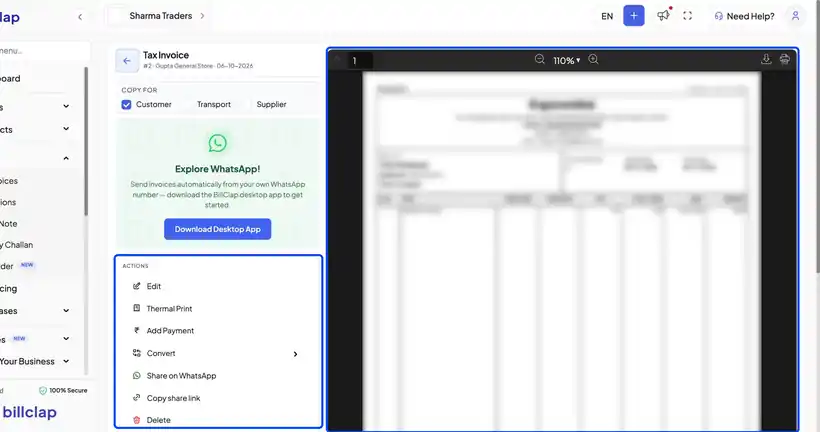
Step 2: Share on WhatsApp or Copy the Link
Share on WhatsApp
Click Share on WhatsApp. WhatsApp opens with a ready message that includes the invoice amount and a link to the invoice. Just pick the chat and tap send.
Copy share link
Click Copy share link. You'll see "Link copied to clipboard". Paste the link into an SMS, email or any chat app.
What your customer sees
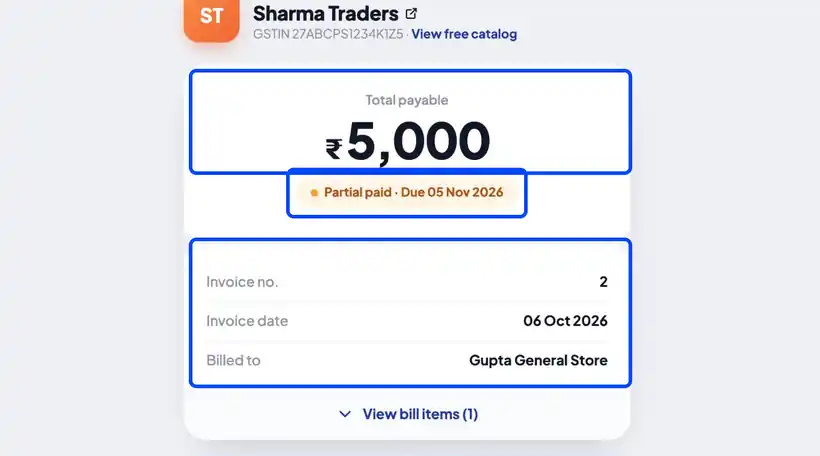
When your customer opens the link, they see a secure page with:
- The total payable amount
- The payment status (for example, Partially paid) and due date
- The invoice details — invoice number, date and items
- A Download PDF invoice button
Step 3: Download the PDF to Email It Yourself
To email the invoice as an attachment, click the download icon above the invoice preview to save the PDF, then attach it to your email. The print icon right next to it prints the invoice.
💡 Tip: Use the Copy For options (Customer, Transport, Supplier) to choose which copy the PDF shows. For a receipt printer, use Thermal Print from the actions.
Frequently Asked Questions
Q: Does my customer need a BillClap account to open the link?
No. Anyone with the link can open the invoice page in their browser.
Q: Will the link show the latest payment status?
Yes. The page shows the invoice's current payment status, so your customer can see what is still due.
Q: Can WhatsApp invoices be sent automatically?
Yes — with the BillClap desktop app you can send invoices automatically from your own WhatsApp number. Look for Explore WhatsApp on the invoice page.
Need Help?
Our support team is available:
- 📞 Call/WhatsApp: 8882468190
- 📧 Email: support@billclap.com
- 🕐 Support Hours: Monday to Friday, 10 AM – 6:30 PM