
Party Reports, Bill-Wise Profit, GSTR-2 and HSN Reports in BillClap
This guide covers the reports that answer four common questions: who owes me money, what does each customer buy, how much did I earn on each bill, and what are my purchase and HSN figures for GST. All of them are under Reports in the left menu.
Party reports
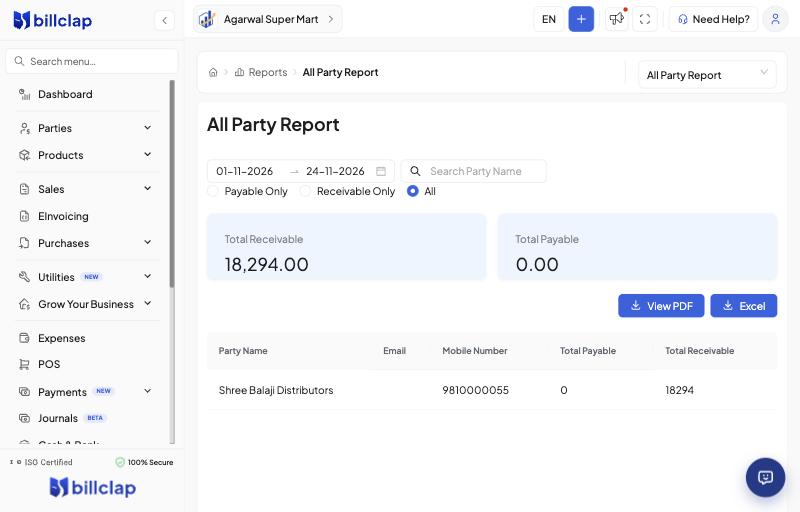
All Party Report: who owes whom
- Under Party Reports, click All Party Report.
- The cards show your Total Receivable (money to collect) and Total Payable (money to pay).
- Choose Receivable Only, Payable Only or All to filter the list.
- Click View PDF or Excel to download.
Customer Report and Vendor Report: one party's history
Open Customer Report or Vendor Report, pick the dates and search for the party. You get every transaction with its date, type, invoice or bill number, total and net balance. Use it when a customer asks, "What is my account?"
To share the same thing as a statement, see How to View and Share a Party Ledger.
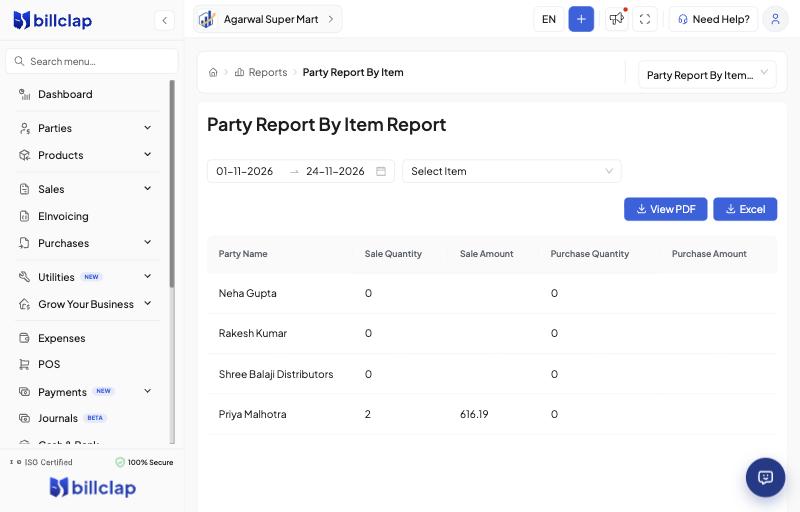
Party Report By Item: who buys what
- Click Party Report By Item Report.
- Choose a product under Select Item.
- For each party you see the quantity and amount sold to them, and bought from them.
Other party reports
- Party Report: a summary across your parties.
- Sale Purchase By Party Report: total sales and purchases for each party.
- Sale Purchase By Party Group Report: the same, totalled by group. See How to Create Party Groups.
- Receivable Ageing Report: how long each due has been pending. See the Receivable Ageing guide.
Bill Wise Profit/Loss Report
Shows the profit on every sales bill.
- Under Transactions, click Bill Wise Profit/Loss Report.
- Pick the dates. Search for a customer if you want only their bills.
- The cards show Total Sale Amount and Total Profit or Loss.
- Each row shows the bill's total cost, tax payable, sale value and profit.
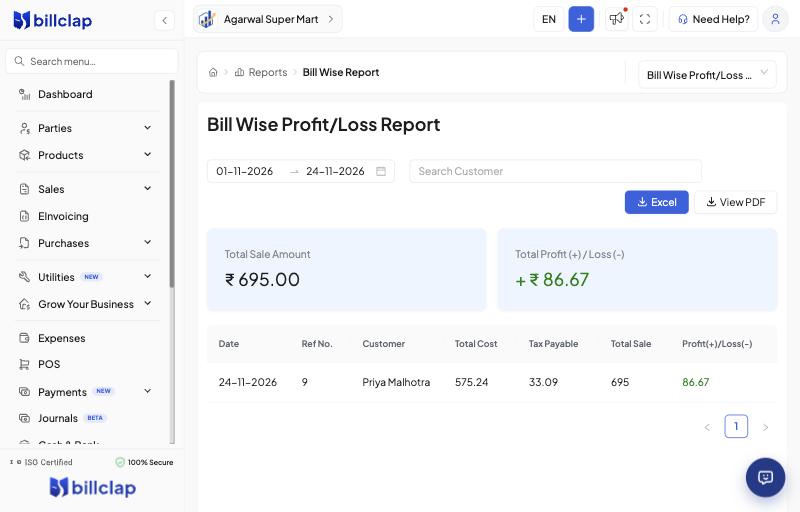
Profit is worked out from the purchase price saved on each product. Keep purchase prices up to date so this report stays correct.
GSTR-2 Report
Under GST Reports, the GSTR-2 Report lists your purchases with the supplier's GSTIN, invoice number, taxable value and CGST, SGST, IGST and cess. Switch between Purchases and Purchase Return at the top, then download as Excel or PDF for your CA.
Sale Report By HSN
Under Transactions, Sale Report By HSN totals your sales by HSN code: total value, taxable amount and IGST, CGST and SGST. It is useful for the HSN summary in your GST return. Items appear here only if the product has an HSN code saved.
Related guides
- Sales, Purchase, Day Book, Expense and Profit & Loss Reports
- Stock Reports
- GSTR-1 Report and GSTR-3B Report
Need Help?
Our support team is available:
- 📞 Call/WhatsApp: 8882468190
- 📧 Email: support@billclap.com
- 🕐 Support Hours: Monday to Friday, 10 AM – 6:30 PM