
How to Track Udhaar (Credit) in BillClap's Udhaar Khata
Customers who buy on credit? Keep every rupee of udhaar in BillClap's Udhaar Khata instead of a paper notebook. You can see at any time how much each customer still owes.
Step 1: Open Udhaar Khata
- Open Udhaar Khata from the menu.
- Click Add Khata Entry.
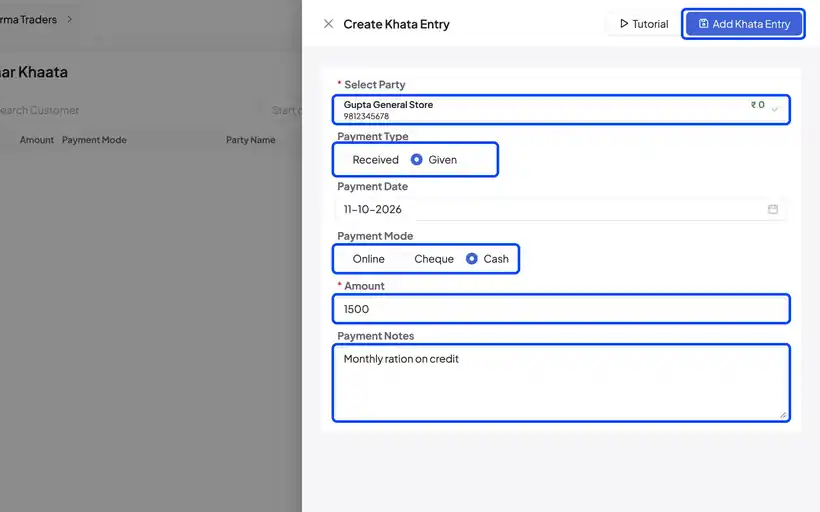
Step 2: Record Udhaar You Give
- Select the customer.
- Choose Given, since you are handing over goods or cash on credit.
- Set the mode, for example Cash.
- Enter the amount, for example ₹1,500, and add a note.
- Save the entry.
Step 3: Record Money When It Comes Back
- When the customer pays, click Add Khata Entry again.
- Select the customer. Their balance shows as a minus amount, for example -₹1,500, which is the amount due.
- Choose Received, pick the mode (for example Online), and enter the amount received, for example ₹500.
- Save the entry.
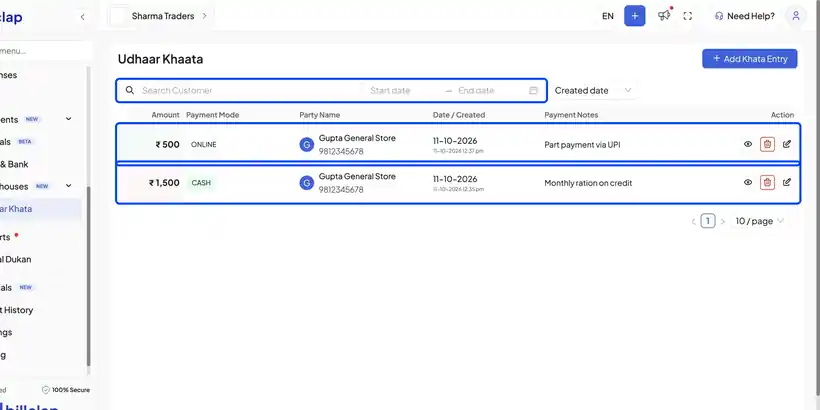
Step 4: Check What Is Still Due
- All entries appear in your khata. Green rows are money received; the others are udhaar given.
- Search by customer or filter by date at any time.
- To see a customer's balance, open a new entry and check the party list. In this example, Gupta General Store now owes ₹1,000.
Frequently Asked Questions
Q: What does a minus balance mean?
A minus balance means the customer owes you that amount.
Q: Is Udhaar Khata the same as an invoice?
No. Udhaar Khata is a simple credit book for quick entries. Use invoices when you need a full bill with items and GST.
Q: Can I remind customers about udhaar?
Yes. Check the balance in Udhaar Khata and message the customer on WhatsApp with the amount due.
Need Help?
Our support team is available:
- 📞 Call/WhatsApp: 8882468190
- 📧 Email: support@billclap.com
- 🕐 Support Hours: Monday to Friday, 10 AM – 6:30 PM